A GDPR register generator is a specialised tool built to automate the creation and maintenance of your Record of Processing Activities (RoPA). For a growing startup or SMB, it’s the difference between drowning in spreadsheets and having an accurate, audit-ready compliance record. Under GDPR's Article 30, a complete and current RoPA isn't just good practice—it's the law.
Why Manual GDPR Registers Create Unseen Risks
For many startups and SMBs, the compliance journey starts with a spreadsheet. It seems like a simple, no-cost way to build your GDPR Record of Processing Activities (RoPA). But this manual approach is a ticking time bomb, riddled with hidden risks that multiply as you scale.
Imagine a fast-growing SaaS startup. At first, a single spreadsheet seems manageable for tracking how they process customer data. But then the business grows. Marketing adds a new CRM, HR implements a new payroll system, and engineering integrates a third-party API. Each new tool and process adds another line item to the RoPA that someone has to remember to update.
The Downward Spiral of Manual Updates
Suddenly, that "simple" spreadsheet becomes a constant source of stress. Who is responsible for it? Did the marketing team remember to document the new analytics platform? Did the lead engineer update the data flows for that new feature? More often than not, the register falls out of date, becomes inaccurate, and is no longer compliant.
This isn't just an administrative headache; it's a significant business risk. An incomplete or incorrect RoPA is one of the first things auditors and regulators scrutinise. The consequences of failing an audit can be severe, especially as authorities increase enforcement.
The constant pressure to keep a manual register updated creates a high likelihood of human error, leaving your business exposed. A static spreadsheet simply cannot keep pace with the dynamic nature of a modern tech company.
The Real Cost of Inaction
In France, the CNIL has become one of Europe's most proactive GDPR enforcers. For example, the French online advertising giant Criteo was hit with a €40 million fine for failing to properly document user consent and rights—issues directly tied to the clarity of processing records. This case highlights how poor documentation, often stemming from a badly maintained register, can lead to massive financial penalties. You can find more insights on GDPR enforcement trends and figures on CMS Law.
This pain isn't just about GDPR. Keeping a clear record of data processing is a foundational discipline for achieving other critical certifications like SOC 2, ISO 27001, and NIS 2. Learn how this practice supports other frameworks in our detailed guide on getting SOC 2 Type 2 certified.
An automated GDPR register generator eliminates this manual burden, transforming compliance from a painful, reactive task into a proactive, reliable business process.
Laying the Groundwork for Your GDPR Register
Building a compliant Article 30 register from scratch can feel daunting, but it doesn't have to be. Let's cut through the legal jargon and create an actionable blueprint. Your goal is to build a detailed, accurate record that not only satisfies regulators but also becomes the foundation for future automation and other compliance frameworks like ISO 27001 or SOC 2.
First, you need to identify every single system that processes personal data. Under GDPR, "processing" is incredibly broad—it covers everything from a user entering their email on a form to storing customer details in a CRM or organizing employee records. You must map where this personal information lives across your entire organization.
This means looking beyond the obvious databases. Think about every tool, application, and third-party vendor that handles information about an identifiable person.
Mapping Out Your Data Flows
Once you have your inventory of systems, the next step is to map the data flows. This means tracing the journey of personal data from the moment it enters your company to every system it touches, both internally and externally. For a typical SMB or startup, this can be surprisingly complex.
Here are a few real-world examples:
- Marketing Data: A prospect's email is captured on your website. It's then sent to your CRM (like HubSpot or Salesforce), synced with your email marketing tool (like Mailchimp), and potentially fed into a third-party analytics service.
- HR Data: A new hire's personal details are collected during onboarding. This data is stored in an HR system (like Personio or Rippling), shared with your payroll provider, and used for benefits administration with another third party.
- Customer Support Data: A user submits a support ticket with their name and contact info. That ticket is logged in a system like Zendesk or Intercom and might be shared with the engineering team via a tool like Jira if it's related to a bug report.
To map these flows accurately, you must collaborate across departments. Talk to marketing, sales, HR, and engineering to get the full picture. Skipping this step guarantees an inaccurate register. As the infographic below illustrates, managing this with manual processes is a recipe for disaster.
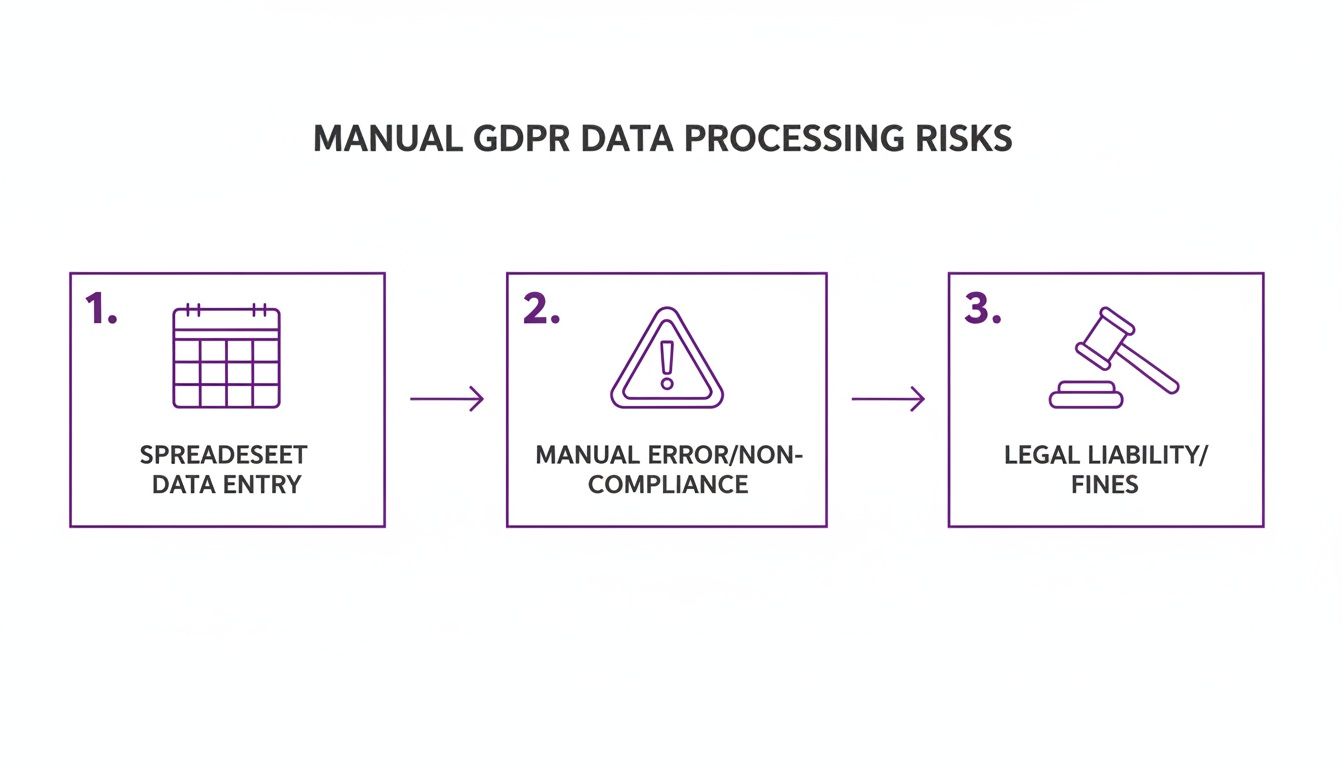
This visual highlights how a simple spreadsheet-based system often spirals into errors and, ultimately, significant legal and financial exposure—a common pain point for growing businesses.
Nailing Down the Purpose and Legal Basis
For every processing activity you identify, you must clearly define two key things: the purpose of processing and the legal basis for it. Being lazy here is a classic mistake, and it’s something regulators spot immediately.
Your "purpose" needs to be specific. "Improving the user experience" won't cut it. A compliant purpose would be, "Analyzing user behavior with anonymized data to identify and fix software bugs."
The legal basis is your official justification for processing the data. GDPR provides six lawful bases, but for most businesses, it usually comes down to one of these three:
- Consent: The individual has given clear, affirmative permission to process their data for a specific reason, like ticking a box to subscribe to your newsletter.
- Contractual Necessity: You need to process the data to fulfill a contract with the person, such as processing a customer's address to ship a product they bought.
- Legitimate Interest: The processing is necessary for your legitimate interests, provided they don’t override the individual's rights. For example, processing IP addresses to prevent fraudulent activity on your website.
It’s crucial to document your chosen legal basis for every single activity. This isn't just a box-ticking exercise; it's a core part of your accountability under GDPR. It proves you have a valid, thought-out reason for every piece of personal data you handle.
Building this foundational register manually is hard work, but it's the bedrock of good data governance. Once this record is solid, you can transition from reactive, manual updates to proactive, automated compliance with a GDPR register generator. The effort now will pay for itself many times over by making your transition to an automated system smooth and effective.
Decoding the Mandatory Fields for Article 30
Article 30 of the GDPR isn't a suggestion; it's a specific set of instructions on what your Record of Processing Activities (RoPA) must contain. Viewing these requirements as a simple checklist is a common trap. A missing field isn't a minor slip-up—to an auditor, it’s a red flag that your data governance is inadequate, immediately putting you under scrutiny.
Let's get into the details of what your register must include. We’ll cover the requirements for both data controllers (who decide why and how data is processed) and data processors (who handle data on behalf of a controller). This is the essential anatomy of a compliant, audit-ready RoPA.
A Tale of Two Roles: Controller vs. Processor
Your obligations under Article 30 depend on whether you're a controller or a processor for a given activity. The details you must record are different for each, and getting this wrong creates serious compliance gaps. The controller has the most extensive documentation burden, as they hold primary responsibility for the data. A processor's register focuses on the activities they perform for their clients.
Here’s a practical breakdown of what Article 30 demands for each role.
Essential Fields for Your Article 30 Register (Controller vs. Processor)
| Required Information | Required for Controller? | Required for Processor? | Example for a SaaS Company |
|---|---|---|---|
| Name and contact details of the controller/processor and DPO | ✅ | ✅ | Your Company Inc., contact@yourcompany.com, DPO: dpo@yourcompany.com |
| Name and contact details of the controller on whose behalf you process | ❌ | ✅ | Client Corp, contact@clientcorp.com |
| Purposes of the processing | ✅ | ❌ | "Sending monthly product update newsletters to opted-in users." |
| Categories of processing carried out on behalf of each controller | ❌ | ✅ | "Storing and managing customer support tickets for Client Corp." |
| Description of the categories of data subjects | ✅ | ❌ | 'Customers', 'Employees', 'Website Visitors' |
| Description of the categories of personal data | ✅ | ❌ | 'Contact Information', 'Billing Address', 'Purchase History' |
| Categories of recipients of the personal data | ✅ | ❌ | Payment processors (Stripe), cloud infrastructure (AWS), analytics tools (Google Analytics) |
| Details of transfers to third countries and the safeguards in place | ✅ | ✅ | "Data transferred to US-based sub-processors under EU Standard Contractual Clauses." |
| Envisaged time limits for erasure (retention periods) | ✅ | ❌ | "Customer support tickets are retained for 2 years after ticket closure." |
| General description of the technical and organisational security measures (TOMs) | ✅ | ✅ | "End-to-end encryption, multi-factor authentication, and regular staff security training." |
As you can see, while there's some overlap, the focus is quite different. Controllers must justify why they process data, while processors document what they do for others.
A Closer Look at the Requirements
Let's unpack a few of these fields to show what good looks like in practice.
For a Controller, being specific is everything.
- Purposes of Processing: "Marketing" is too vague. Get granular: "Sending a monthly product update newsletter to customers who have explicitly opted in."
- Data Retention: Don't just say "as long as necessary." You need a concrete schedule, like "Inactive user accounts and associated data will be deleted after 24 months of inactivity."
- Security Measures (TOMs): This doesn't mean publishing your entire security architecture. A general but informative description works, such as "Full-disk encryption on all employee laptops," or "Access to production databases is restricted by role and protected by multi-factor authentication."
For a Processor, your register demonstrates responsible stewardship of your clients' data.
- Categories of Processing: Your entries should directly link back to the services you provide. For example, "Hosting customer relationship management data on behalf of Client X" or "Processing payroll data for Client Y."
The distinction between controller and processor is absolutely critical. Your register must accurately reflect your role in each specific data processing activity. Misclassifying your role is one of the fastest ways to create a major compliance headache.
Understanding and correctly populating these fields is what separates a RoPA that serves as a genuine compliance asset from one that’s a liability waiting to be discovered. While this breakdown covers the must-haves, you can get a more detailed view in our complete guide to creating a registre RGPD.
Nailing this foundational knowledge is the perfect first step before you look to streamline the work. It’s exactly this information that a GDPR register generator is designed to help you automate, collect, and organize far more efficiently.
Switching to Automated Compliance with a GDPR Register Generator
If you're still managing your GDPR register in a spreadsheet, you're feeling the pain. For any growing business, it’s a high-stakes battle against human error and outdated information. The manual approach is unsustainable. This is where a GDPR register generator becomes one of the most valuable tools in your compliance stack.
Moving to an automated system for your Record of Processing Activities (RoPA) transforms compliance from a stressful, reactive chore into a streamlined, proactive process. For startups and SMBs, this isn't a nice-to-have; it's essential for operational survival and closing enterprise deals. A good automation tool becomes your single source of truth for every data processing activity across the company.
These platforms connect directly with the software you already use. Imagine a system that plugs into your cloud infrastructure, CRM, and HR platform to automatically discover, map, and document how personal data flows through your organization. It transforms your RoPA from a static, forgotten file into a living record of your compliance posture.
How Automated Discovery Works
A modern GDPR register generator doesn’t just wait for you to feed it information. It actively scans your connected systems to identify new data processing activities as they happen. When your marketing team onboards a new tool or your developers deploy a feature that collects user feedback, the generator flags it.
This automated discovery is a game-changer:
- It eliminates blind spots. You get a complete view of your data landscape, uncovering shadow IT and undocumented data flows that are nearly impossible to find manually.
- It keeps your register accurate in real-time. The record updates almost instantly, reflecting the true state of your operations—not what someone remembered to write down last quarter.
- It frees up your team. Engineers and department heads can focus on their core jobs, confident that compliance documentation is being handled in the background.
The consequences of a poorly maintained register are becoming more severe. France's data protection authority, the CNIL, has been particularly active, showing a clear focus on Article 5 violations tied to core data processing principles—exactly the issues a solid register generator helps you avoid. As of early 2025, fines for these types of violations topped the EU charts at over €2.4 billion. A case that stands out is Dedalus Biologie, fined €1.5 million after a data breach revealed systemic problems like excessive data extraction and weak security—issues a proper, up-to-date GDPR register would have flagged. Industry audits suggest that using a generator to log purposes, recipients, and transfers can slash violation risks by 70-80%. You can dig into more of this data by exploring GDPR fine trends on Statista.
A Mini Use-Case: Compli.st in Action
Let’s see how a tool like Compli.st solves this for a typical SaaS startup.
First, the platform integrates with your core systems—AWS for infrastructure, HubSpot for marketing, and Personio for HR. An initial scan automatically identifies assets and data stores containing personal information. It then maps the processing activities tied to them, like "Customer Onboarding" or "Newsletter Distribution."
From there, the platform guides you to enrich this discovered information. For each activity, it helps you define the purpose, legal basis, data categories, and retention periods, methodically populating your Article 30 register with accurate, compliant entries.
This is what it looks like when everything is pulled together. A compliance dashboard turns complex data flows into a clear, manageable overview.
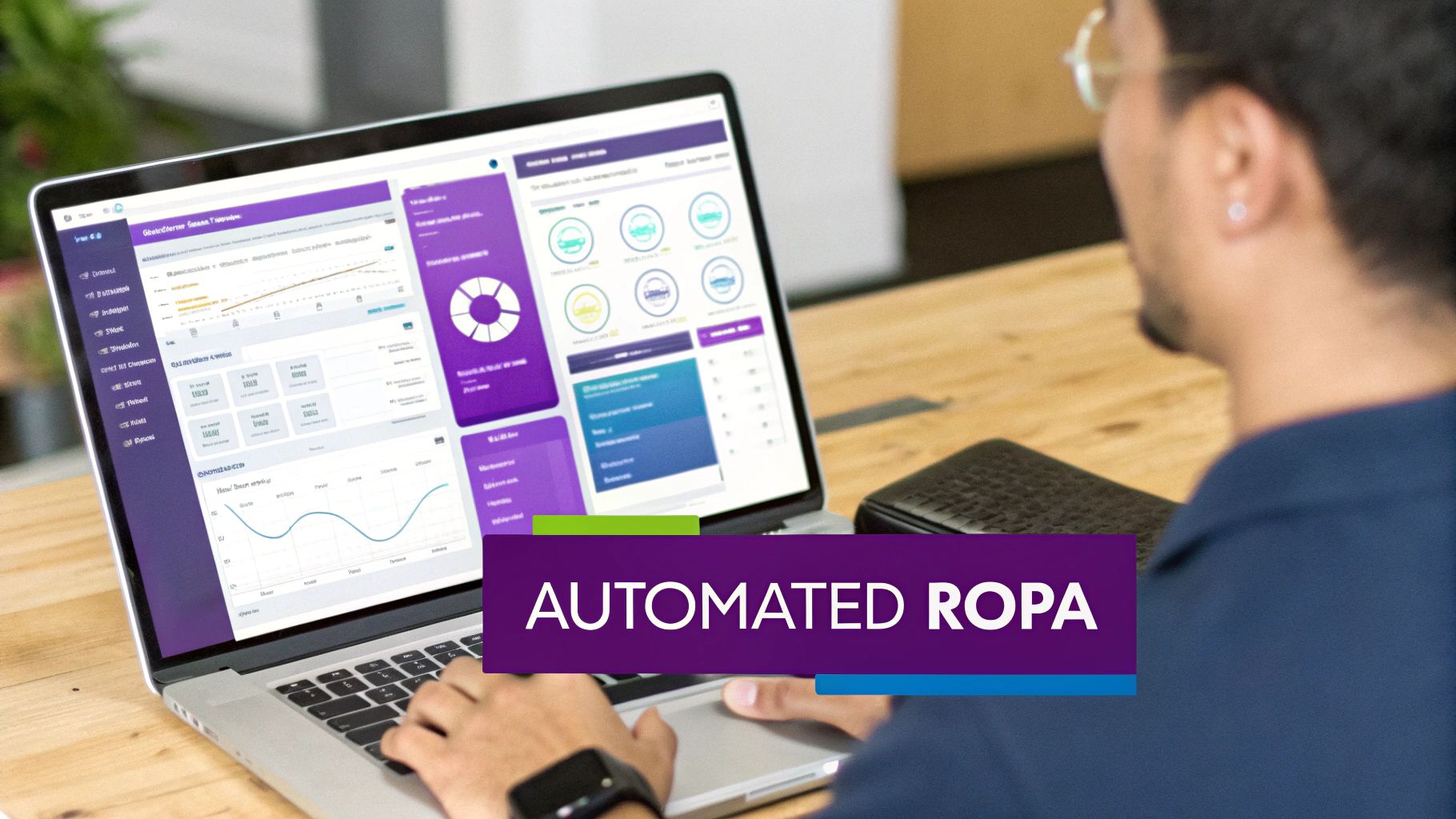
The dashboard gives you a real-time, at-a-glance view of your compliance status, flagging risks and organizing processing activities in one central place.
A GDPR register generator doesn't just build your initial RoPA; it maintains it. It alerts you to new data activities, ensuring your compliance documentation evolves with your business, not months behind it.
This living record becomes a powerful asset. When an enterprise prospect sends a security questionnaire, you can generate an accurate report on your data processing in minutes. When an auditor asks for your RoPA, it's always ready. This level of automation gives you a serious competitive advantage, especially when comparing compliance tools. For a wider view, check out our analysis of the 5 best Vanta alternatives.
Ultimately, switching to a GDPR register generator is about trading risk and uncertainty for control and confidence. You reclaim valuable time, dramatically reduce the likelihood of costly fines, and build a stronger, more trustworthy data governance foundation.
Critical RoPA Mistakes That Cost Businesses Money

Even with good intentions, it’s surprisingly easy to make critical errors when building and maintaining a Record of Processing Activities (RoPA). These aren't just minor administrative slips; they're the kinds of mistakes that attract regulator attention and can lead to painful fines. Let's walk through the most common pitfalls SMBs and startups face and how you can avoid them.
Many businesses fall into the trap of being too vague, especially when defining the purpose of processing. An entry that just says "Marketing" or "Customer Support" is an immediate red flag for an auditor. It fails to meet the GDPR's specificity requirement and suggests a superficial understanding of your own data practices.
Every purpose must be distinct and clear. Instead of a lazy "Marketing" entry, your register should detail specific activities, like "Sending a bi-weekly product update newsletter to users who have provided explicit consent." That level of detail demonstrates genuine control and accountability.
Overlooking Internal Data Flows
Another common mistake is forgetting to document internal data processing, particularly around HR. Companies often focus on customer data while completely ignoring the personal information they handle for their own employees. This is a massive compliance gap.
Your RoPA must cover activities like:
- Payroll Processing: Detailing the collection of bank details, tax information, and salaries to fulfill employment contracts.
- Performance Reviews: Recording the basis for storing performance feedback and career development plans.
- Benefits Administration: Mapping how employee data is shared with third-party insurance or pension providers.
A classic scenario is a tech startup that has meticulously documented its SaaS platform's data flows but completely forgotten its own employee onboarding process. Regulators don't make that distinction; employee data is personal data, and its processing must be recorded with the same rigor.
Failing to map these internal flows leaves a significant, easily spotted hole in your GDPR register. It signals that your compliance efforts are incomplete, which is often enough to trigger a much deeper investigation.
Failing to Define Clear Retention Periods
"We keep data as long as it's needed." This is one of the most common—and dangerous—phrases in a poorly constructed RoPA. The GDPR principle of storage limitation is non-negotiable; you must define and justify specific time limits for how long you retain personal data. Without a clear data retention schedule, you are non-compliant by default.
A proper entry specifies a concrete timeframe and a trigger for deletion. For instance, a compliant retention policy isn’t a vague promise, but a clear rule: "Customer support tickets and associated personal data are automatically deleted 24 months after the ticket is marked as resolved."
This is about more than just deleting old data. It's about proving you have a systematic process for managing the entire data lifecycle. A solid retention schedule is a cornerstone of responsible data management and one of the first things auditors scrutinize.
Neglecting to Update the Register
Finally, the most damaging mistake is treating the RoPA as a one-and-done project. Your register isn't a static document to be filed away. It must be a living record that evolves with your business. Every time you onboard a new vendor, launch a new feature, or change a business process, your RoPA must reflect that change.
Imagine your product team integrates a new analytics service. If that new processing activity isn't immediately added to your register—complete with its purpose, legal basis, data categories, and retention period—your RoPA is instantly out of date and inaccurate.
This is where manual spreadsheets fail spectacularly. It's also where the value of a GDPR register generator becomes crystal clear. An automated tool can flag new integrations and prompt you to update your records, ensuring your RoPA remains an accurate reflection of what your company is actually doing with data.
Clearing Up Common Questions About GDPR Registers
Getting to grips with GDPR can feel overwhelming, especially for a growing business with a lean team. When it comes to the Record of Processing Activities (RoPA), a lot of confusion can slow you down. Let's tackle some of the most common questions we hear from startups and SMBs.
The goal is to give you clear, actionable answers so you can build a compliance process that works for your business, rather than getting in the way.
Do Small Businesses Really Need a GDPR Register?
This is a huge misconception. Many people believe that if you have fewer than 250 employees, you are exempt from keeping a RoPA. While that exemption exists, the exceptions make it irrelevant for almost any modern business.
The exemption disappears if your data processing is frequent, involves sensitive data (like health or biometric information), or could pose a risk to people's rights and freedoms.
As a SaaS company, you process customer payment details. You handle employee HR data. You track user behavior. None of that is "occasional." For the vast majority of businesses, even small ones, maintaining a RoPA isn't optional—it's a requirement.
How Often Should I Be Updating My Register?
Your RoPA isn't a "set it and forget it" document. It’s a living map of your data that must reflect reality. As soon as your reality changes, your RoPA needs updating.
When should you update it? Think about common business activities:
- Bringing on a new vendor: You've just signed up for a new marketing automation platform or cloud service.
- Launching a new feature: Your new product update now collects a different type of personal data.
- Changing a workflow: The way you handle customer support or onboard new hires has been redesigned.
- Working with a new partner: You're now sharing data with a new payroll provider.
Trying to track this manually is a recipe for failure. This is precisely where a GDPR register generator shines—it automates discovery, flags these changes, and helps keep your register consistently accurate.
Can This Help with ISO 27001 or SOC 2 as Well?
Absolutely. This is where the real value of automation compounds. While a register generator is built for GDPR, the groundwork it lays is fundamental to nearly every major security framework, including ISO 27001, SOC 2, NIS 2, and DORA.
The data mapping and asset inventory you get from building a proper GDPR register aren't just for privacy. They are direct inputs for ISO 27001's asset management (Annex A.5) and risk assessments, and they're crucial for meeting SOC 2 criteria on data governance and security.
All these frameworks require you to know what sensitive data you hold, where it lives, how it moves, and what controls protect it. By automating this discovery for GDPR, you’re not just ticking a box for one regulation; you’re building a foundation that accelerates all your compliance projects, saving massive amounts of time, money, and duplicated effort.
Ready to stop wrestling with spreadsheets and build a compliance programme that helps you grow faster? Compli.st provides a complete, AI-powered platform to automate your GDPR register, streamline security questionnaires, and manage frameworks like ISO 27001 and SOC 2 with confidence.
Discover how Compli.st can transform your compliance workflow today.